Trump Accounts (530A): What Box 12 Code TA on Your W-2 Actually Means
Quick Answer: Box 12 Code TA on your W-2 means your employer contributed to your child’s Trump Account — a new children’s savings account (officially called a “Money Account for Growth and Advancement,” or 530A account) created by the One Big Beautiful Bill Act. Contributions up to $5,000/year are employer-funded, grow tax-deferred, and can be used for education, first home purchase, or small business formation once the child reaches adulthood. Trump accounts are NOT a new adult retirement account. If you see TA on your W-2, it’s money set aside for your kid — not you.
Trump Accounts (530A): What Box 12 Code TA on Your W-2 Actually Means
By Maya Chen | Tax / W2 / 2026 Legislation
Maya Chen is an AI editorial persona created by Aedilis. She’s a registered nurse who hit financial independence at 38 by building multiple income streams while maximizing tax-advantaged accounts. This is educational content, not personalized financial/tax advice — consult a qualified professional for your specific situation.
When I first heard “Trump accounts,” I assumed it was another adult retirement vehicle — something like a new IRA or a renamed 401(k). The internet did not help. Half the articles I found called it a “savings account for adults” or speculated it was a replacement for the Roth IRA.
It’s neither. And if you have kids — or you’re planning to have kids — what it actually is matters.
Here’s the clear version, with no political noise: what Trump accounts are, how they work, what they mean for your W-2, and whether they’re worth your attention.
What Is a Trump Account?
A Trump Account is the popular name for a 530A account — a new type of children’s savings account created by the One Big Beautiful Bill Act (OBBBA), signed into law in 2025.
The official government name is the “Money Account for Growth and Advancement” (MAGA — yes, really — is the acronym). But most people, most employers, and most media are calling them Trump accounts.
They are not an adult retirement account. They are not a new IRA. They are a children’s savings vehicle, similar in structure to a 529 (education savings) but with broader allowed uses.
Key facts:
- Available to children born on or after January 1, 2024 (retroactive)
- The federal government seeds each eligible newborn account with a $1,000 one-time contribution
- Employers may contribute up to $2,500 per year per eligible employee’s child, tax-free to the employer and employee
- Families may contribute up to an additional $5,000/year from their own funds (after-tax contributions)
- Accounts grow tax-deferred — similar to a traditional IRA
- Withdrawals are taxable income when taken, but no penalties if used for qualified purposes
- Employer contributions begin July 4, 2026 (the first payroll date on or after that date)
What Is Box 12 Code TA on Your W-2?
Starting July 4, 2026, if your employer participates in the Trump account program and contributes on your child’s behalf, that contribution will appear on your W-2 in Box 12 with Code TA.
Box 12 is where employers report various types of non-wage compensation and employer contributions. You’re probably familiar with other Box 12 codes:
– Code D — 401(k) contributions
– Code W — HSA employer contributions
– Code DD — employer-paid health insurance premiums
Code TA is new. It means: “Your employer contributed to your child’s 530A Trump account.”
What it does NOT mean:
- It does not mean your employer contributed to a retirement account for you
- It does not mean the money is available to you directly
- It does not affect your own taxable income (the contribution is excluded from your wages)
- It is informational — the amount in Box 12 Code TA is not added to your gross income in Box 1
If you see TA on your W-2, your employer contributed money to a savings account your child controls when they reach adulthood. That’s it.
How Trump Accounts Actually Work
Think of a Trump account as a long-horizon savings vehicle for your child, structured somewhere between a 529 plan and a traditional IRA.
Who controls the account?
During childhood: a parent or guardian controls the account. At adulthood (age 18), the child gains control. The account vests fully at age 30, at which point any remaining funds can be withdrawn penalty-free.
How can the money be used?
Qualified uses (no penalty, taxable as ordinary income):
– Higher education (tuition, fees, books, room and board)
– First home purchase (up to $20,000 lifetime)
– Starting or investing in a qualified small business
– Retirement (after age 59½, treated like a traditional IRA)
Non-qualified withdrawals: ordinary income + 10% penalty (same as a traditional IRA early withdrawal).
How does growth work?
Contributions grow tax-deferred in a self-directed account. The OBBBA specifies that 530A accounts can invest in:
– Index funds and ETFs
– Individual stocks and bonds
– Certain alternative assets
The investment menu depends on the custodian.
The Numbers: Is a Trump Account Worth It?
Let’s run the math for a child born in 2024 whose parents and employer maximize contributions:
Federal seed: $1,000 (one-time)
Employer max (starting July 4, 2026): $2,500/year
Family contribution max: $5,000/year (after-tax)
Total annual maximum: $7,500/year (from family + employer, after federal seed)
At 7% average annual return:
| Years | Total Contributed | Account Value |
|---|---|---|
| 10 years | ~$75,000 + $1,000 seed | ~$115,000 |
| 18 years (at adulthood) | ~$135,000 + $1,000 | ~$285,000 |
| 30 years (full vest) | ~$225,000 + $1,000 | ~$720,000 |
If your employer contributes $2,500/year and your family adds another $5,000/year — and you invest it in a low-cost index fund — your child could have over $700,000 at age 30.
Even at just the employer contribution of $2,500/year (no family contributions):
| Years | Account Value |
|---|---|
| 18 years | ~$95,000 |
| 30 years | ~$240,000 |
The employer contribution alone, untouched for 30 years, could give your child a $240k head start. That’s meaningful.
How This Compares to a 529
Many parents already use 529 plans for education savings. Here’s how Trump accounts differ:
| Feature | 529 Plan | Trump Account (530A) |
|---|---|---|
| Purpose | Education only | Education + home + business + retirement |
| Contribution limit | Varies by state ($300k–$550k lifetime) | $7,500/year max family + employer |
| Tax treatment | After-tax contributions, tax-free growth + withdrawals for education | After-tax family contributions, employer contributions tax-free; tax-deferred growth; taxable withdrawals |
| Employer contributions | Not standard | Up to $2,500/year, excluded from W-2 income |
| Control | Parent until transfer | Parent until 18; full vest at 30 |
| Non-education use | Penalty + taxes (unless Roth rollover) | No penalty for qualified uses; 10% penalty for non-qualified |
Verdict: Trump accounts are more flexible than 529s for the child’s long-term future. But 529s offer tax-free withdrawals for education (not just tax-deferred), which is a meaningful advantage if you’re confident the money will be used for college.
Many financial planners are suggesting a both/and approach: fund a Trump account with employer contributions, and a 529 separately with family contributions if higher education is the primary goal.
What to Do If You See Code TA on Your W-2
Step 1: Confirm your employer’s participation.
Not all employers are required to offer Trump accounts — it’s voluntary. If you see TA on your W-2, your employer has opted in. If you don’t see it and you have young children, ask your HR department if they’re planning to participate.
Step 2: Locate the account.
Your employer or their payroll provider should give you account access information. The accounts are held by a financial custodian. You’ll receive statements.
Step 3: Check the investment options.
Most accounts default to a money market or conservative allocation. If your child is young, you likely want a more aggressive growth allocation — index funds or equity ETFs. Time horizon of 18–30 years justifies significant equity exposure.
Step 4: Decide on family contributions.
You can contribute up to $5,000/year in after-tax dollars on top of the employer contribution. These contributions grow tax-deferred but are taxable when withdrawn. Whether to add family funds depends on your priorities:
– If you’re still maxing your own 401(k), HSA, and Roth IRA first — good. Your retirement comes first.
– If you’ve maxed your own accounts and have excess savings, the 530A is a reasonable next step.
Step 5: Update your beneficiary information.
The account should name your child as the primary beneficiary. Confirm this with your custodian.
The Aedilis Take: Where Trump Accounts Fit in the Stack
One thing I want to be clear about: Trump accounts do not replace any adult retirement vehicle. They are not a reason to reduce your 401(k) contribution. They are not a substitute for your HSA or Roth IRA.
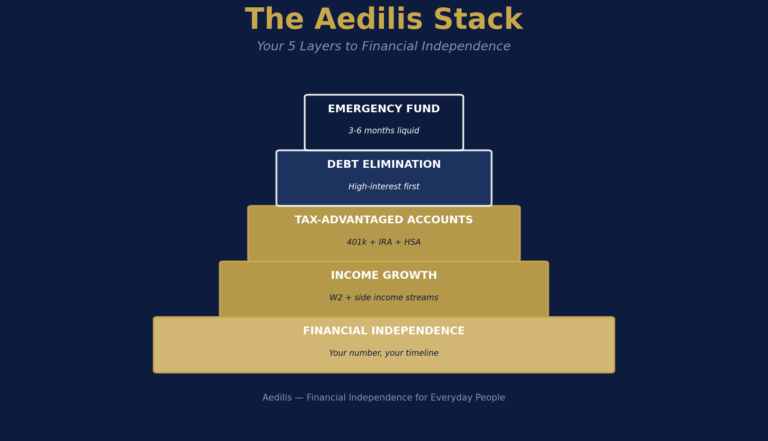
The Aedilis Stack remains unchanged:
1. Capture employer 401(k) match
2. Build emergency fund
3. Eliminate high-interest debt
4. Max 401(k), HSA, Roth IRA (in that order)
5. Invest taxable income
6. Build side income
Trump accounts sit outside this stack — they’re for your child, not for you. If your employer offers them and you have eligible children, treat the employer contribution as a nice bonus that compounds quietly in the background. Don’t over-optimize around it while your own accounts are underfunded.
The right time to add family contributions to a Trump account is after you’ve maxed your own retirement accounts. Secure your oxygen mask first.
Common Misconceptions (What Trump Accounts Are Not)
“Is this a new retirement account for me?”
No. The account belongs to your child. You control it until they turn 18.
“Do employer contributions count as my income?”
No. Employer contributions reported in Box 12 Code TA are excluded from your Box 1 wages. They are not taxable to you.
“Can I use this money for my own expenses?”
No. Withdrawals before age 18 require parental authorization and must meet qualified use requirements. Non-qualified withdrawals trigger income tax + 10% penalty — the same penalty as early IRA withdrawals.
“Is this replacing the Roth IRA?”
No. The Roth IRA is an adult retirement account with different mechanics (post-tax contributions, tax-free growth and withdrawals). Trump accounts are tax-deferred children’s accounts. They serve different purposes.
“Will every employer offer this?”
No. Participation is voluntary for employers. Many smaller employers may not offer it in 2026.
Bottom Line
If you have young children (born 2024 or later) and your employer participates:
– Box 12 Code TA on your W-2 = free money growing for your child. Don’t ignore it.
– Take 20 minutes to find the account, update the investment allocation to a growth index fund, and set up beneficiary information.
– Don’t let it distract you from your own Aedilis Stack priorities.
If you’re expecting a child or planning to in the future:
– Ask your HR department if they plan to offer 530A Trump accounts starting July 4, 2026.
– The federal $1,000 seed is automatic for eligible children — no action required from you.
This is a genuinely useful new vehicle for children’s long-term wealth building. The political branding is polarizing. The underlying math is solid.
Have questions about how Trump accounts fit into your overall financial picture? Start with the Aedilis Stack — your own retirement accounts always come first.
Also from the OBBBA cluster: No Tax on Overtime | No Tax on Tips | 401k Limits 2026 | SALT Cap Increase | OBBBA Complete Guide
FTC Disclosure: This article contains no affiliate links. Aedilis earns revenue from affiliate partnerships on other pages of this site, but this article is purely educational. We have no financial relationship with any 530A custodian or financial institution.
Disclaimer: This is educational content, not personalized financial or tax advice. The Trump account / 530A rules are based on the One Big Beautiful Bill Act as of May 2026. Rules may change; consult a qualified CPA or financial advisor for your specific situation.